> For the complete documentation index, see [llms.txt](https://waf-doc.inext.checkpoint.com/llms.txt). Markdown versions of documentation pages are available by appending `.md` to page URLs; this page is available as [Markdown](https://waf-doc.inext.checkpoint.com/getting-started/deploy-enforcement-point/kubernetes/envoy-application-security-injector.md).
# Envoy Application Security (Injector)
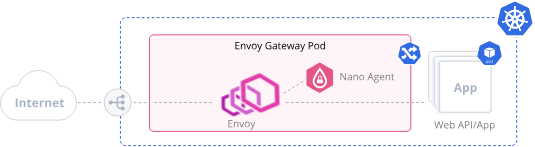
CloudGuard WAF for Envoy Gateway is deployed using a Helm chart that includes a namespace-level webhook. This webhook monitors changes to the Envoy Gateway deployment and automatically injects the required WAF agent and attachment into the gateway pods. The configuration of Envoy Gateway follows standard practices for defining gateway resources and routing traffic to your services.
### Prerequisites
* Envoy Gateway deployed in your Kubernetes cluster
* Envoy image must use: `envoyproxy/envoy:contrib-` Kubernetes cluster with RBAC enabled and cluster-admin permissions
* Helm 3 installed on your local machine
* kubectl installed and configured to access your cluster
* A profile created in the CloudGuard UI with the agent token copied and policy set to **Enforce**
### Installation
#### Step 1 – Create profile and copy token
Create any profile in the CloudGuard UI, copy the agent token, and ensure the policy is set to **Enforce**.
### Installation
#### Step 1 – Create profile and copy token
Create any profile in the CloudGuard UI, copy the agent token, and ensure the policy is set to **Enforce**.
#### Step 2 – Label the gateway namespace
```
kubectl label namespace inject-waf-attachment="true" --overwrite
```
#### Step 3 – Label the Deployment
Ensure your Envoy Gateway Deployment includes the labels required by the webhook.objectSelector:
* webhook.objectSelector.labelName
* webhook.objectSelector.labelValue
Example:
```
kubectl label deployment