> For the complete documentation index, see [llms.txt](https://waf-doc.inext.checkpoint.com/llms.txt). Markdown versions of documentation pages are available by appending `.md` to page URLs; this page is available as [Markdown](https://waf-doc.inext.checkpoint.com/getting-started/monitor-events/ddos-dashboard.md).
# DDoS Dashboard
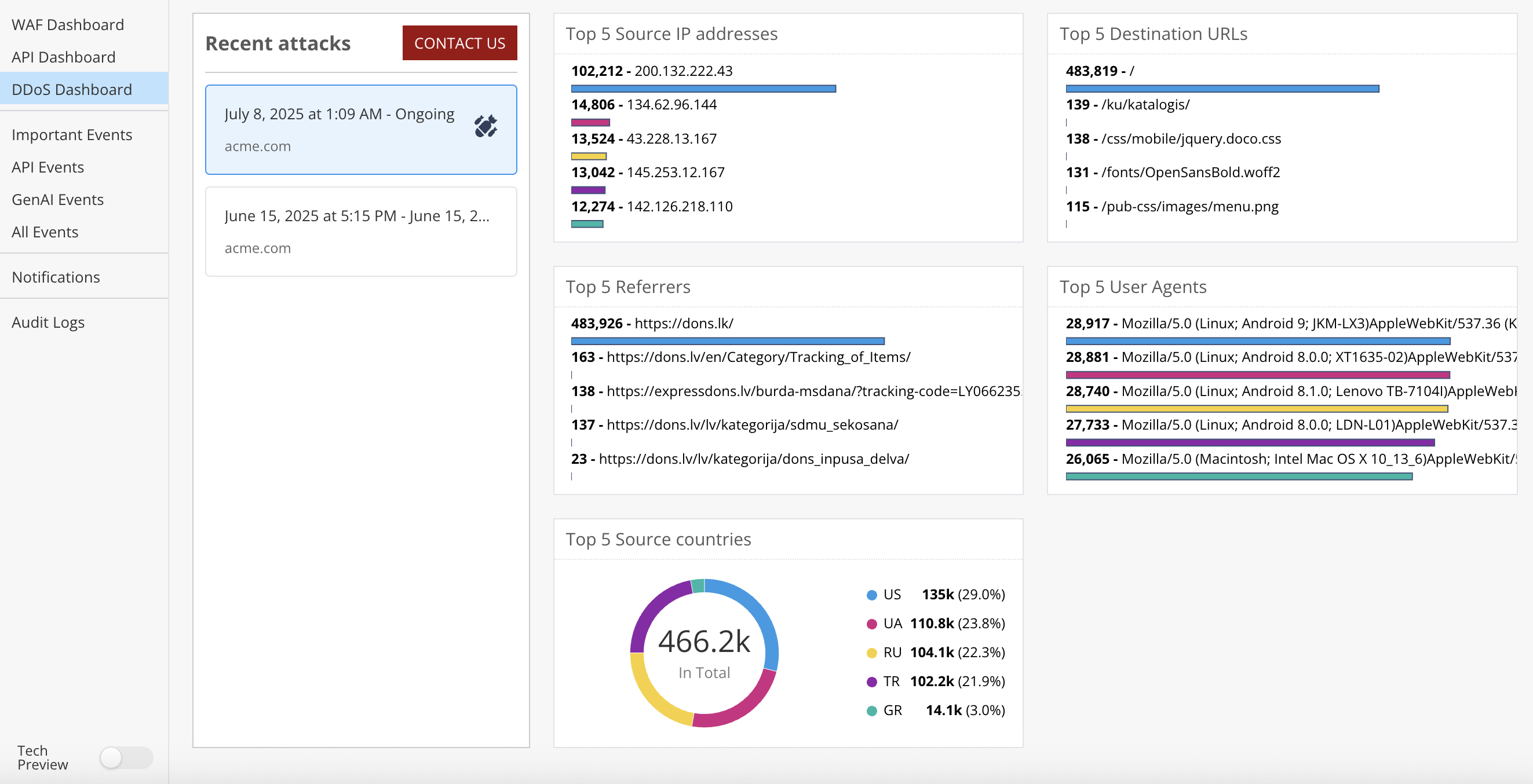
The DDoS Dashboard offers centralized, real-time visibility into Distributed Denial of Service (DDoS) activity targeting your applications and APIs. It enables security teams to quickly assess the scope, behavior, and progression of ongoing and past attacks.
{% hint style="info" %}
DDoS Protection is available for CloudGuard WAF SaaS. It is not available with other local (Gateway, Agent) editions of the product.
{% endhint %}
Following is a description of the Dashboard sections:
| Section | Description |
| ----------------------- | ---------------------------------------------------------------------------------------------------------------------------------------------------------------------------------------------- |
| Recent Attacks | Displays a timeline of detected DDoS attacks, including start time, status (e.g., ongoing or resolved), and affected domains. Users can select an event to drill down into detailed telemetry. |
| Top Source IP Addresses | Lists the IPs responsible for the most traffic during an attack. This helps identify major attack sources or botnet activity. Visual bars help compare relative impact. |
| Top Destination URLs | Shows the application endpoints most frequently targeted by DDoS traffic, helping to pinpoint abuse patterns [#ddos-dashboard](#ddos-dashboard "mention") |
| Top Referrers | Identifies external referrer domains linked to attack traffic. This can highlight misused third-party websites or coordinated bot campaigns. |
| Top User Agents | Displays the most common User-Agent headers observed during an attack, revealing whether bots are spoofing browser or device signatures. |
| Top Source Countries | Visualizes geographic origin of traffic in a chart, indicating which regions are contributing to the attack load. Useful for geolocation-based defense strategies. |
See also:
{% content-ref url="/pages/PknEzxSz7EH2nw0cGBdV" %}
[DDoS Protection](/concepts/ddos-protection.md)
{% endcontent-ref %}
---
# Agent Instructions
This documentation is published with GitBook. GitBook is the documentation platform designed so that both humans and AI agents can read, navigate, and reason over technical content effectively. Learn more at gitbook.com.
## Querying This Documentation
If you need additional information that is not directly available in this page, you can query the documentation dynamically by asking a question.
Perform an HTTP GET request on the current page URL with the `ask` query parameter, and the optional `goal` query parameter:
```
GET https://waf-doc.inext.checkpoint.com/getting-started/monitor-events/ddos-dashboard.md?ask=&goal=
```
`ask` is the immediate question: it should be specific, self-contained, and written in natural language.
`goal` is optional and describes the broader end goal you are ultimately trying to accomplish on behalf of the user. GitBook uses it to tailor the answer towards what is most useful for that goal.
The response will contain a direct answer to the question and relevant excerpts and sources from the documentation.
Use this mechanism when the answer is not explicitly present in the current page, you need clarification or additional context, or you want to retrieve related documentation sections.